

Repma digital menu
QR digital menu for restaurants and cafés
Repma's digital menu is a QR code menu for restaurants and cafés in Saudi Arabia: guests scan the table code and the menu opens on their phone at menu.repma.io, with no app, in Arabic and English. Import dishes and prices from your Google Business Profile, a paper menu photo, a PDF or your current menu link, check the draft, then publish and print the QR code in your brand look. The menu shows photos, sizes, sale prices, sold-out marks and SFDA calories. It is display only: no online ordering, cart or payment. It is included in Repma from 119 SAR per location per month with a 7-day trial.
- 7-day trial
- Cancel anytime
- No app for guests
Demo menu
Try a real QR menu right here
This is the menu of a made-up café called Lawz, on the same screen your guests see after they scan. Try it yourself:
- Switch between Arabic and English with the language button
- Open any dish to see its photos, sizes, calories and caffeine
- See the sale price on the pistachio cheesecake, with the original crossed out
- Spot the sold-out mark on the cookies
- Switch between photo cards and the compact list
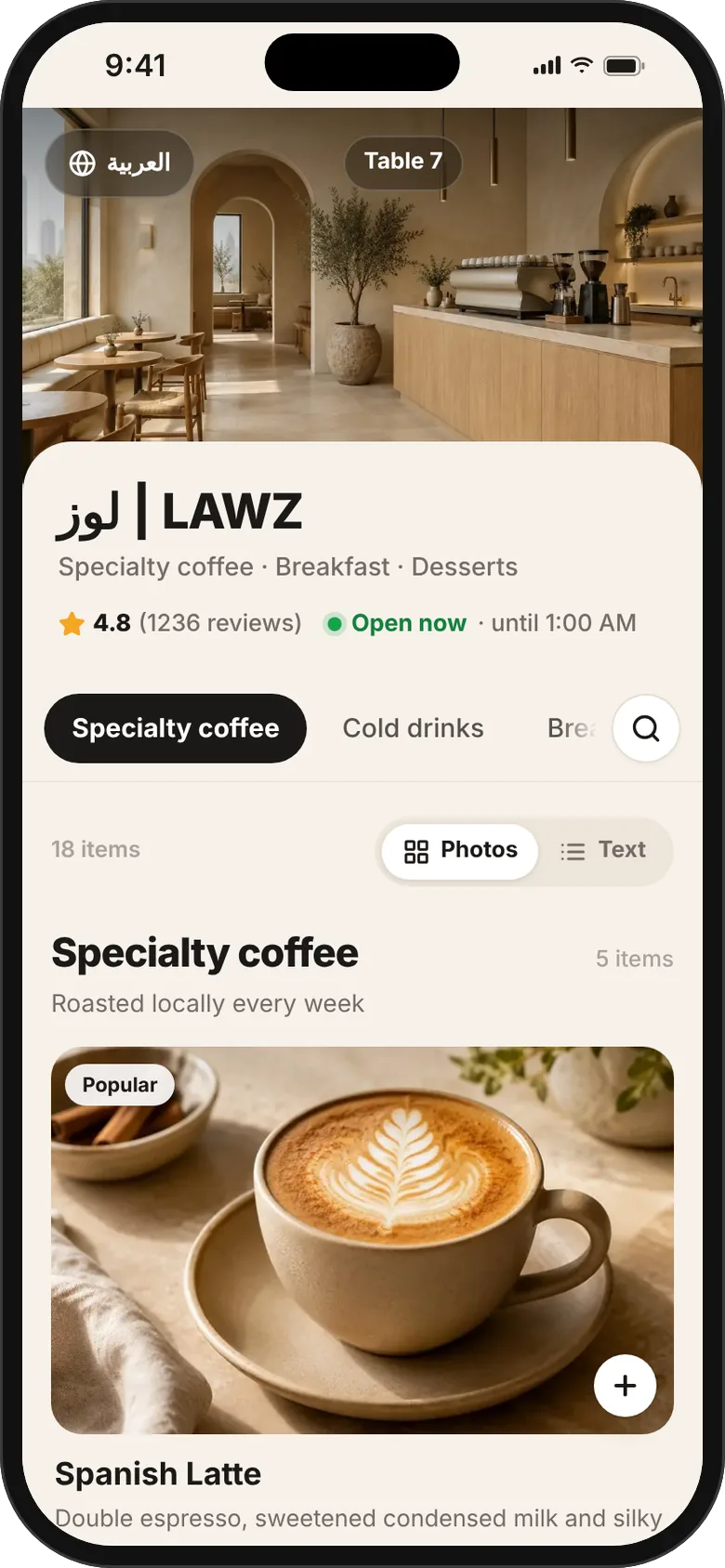
Scroll and open any dish, the menu works inside the phone
How it works
How to make a digital menu for your restaurant in 3 steps
- 1
Import your menu
Connect your Google profile and Repma copies the sections, dishes and prices written there. No written menu on Google? Pick the menu photos on your profile, photograph the paper menu, upload a PDF, or paste the link to your current menu, such as another QR menu or a file on Google Drive.
- 2
Check and publish
The menu arrives as a draft. Check prices, sizes and photos, tap Translate to fill empty Arabic and English fields, then publish to your menu.repma.io link.
- 3
Print the QR code
In the print studio, print numbered table stands, stickers or a poster with your logo and colours. Every later edit shows for guests right away, with no reprint.
Features
Everything a restaurant or café menu needs
A clear menu each guest reads in their language, and you update in seconds.
Arabic and English in one tap
Guests switch language inside the menu. Translate fills only empty fields, keeps your text and invents no descriptions.
Photos for every dish
Photo cards or a compact list without photos, with search and a sticky section bar, and a sheet per dish with its photos and sizes.
Sold out today
Ran out of something? Mark it sold out today in one tap, or hide a dish or a whole section without deleting it.
Sale prices
Set a sale price and guests see the original crossed out next to it. A dish with several sizes shows “from” the lowest price.
SFDA calories
Calories next to each dish, caffeine for drinks, the high-salt mark and eight allergens from the SFDA list. You enter or confirm the numbers; Repma never invents them.
QR design in your brand
A print studio for table stands, round stickers and posters: upload your logo and take its colours, pick the layout, font and QR shape, and add your Wi-Fi details.
Your look on the guest's phone
A cover from Google or your own photos, colours and a font that suit your place, your logo next to the name, and links to your Instagram, Snapchat, TikTok and X.
Menu visit numbers
The last 14 days: visits and peak time, most viewed dishes, tables, guest language and what guests search for. You also see the dishes guests name in their Google reviews.
Who it is for
A QR menu for every food and drink place
Restaurants
From mandi and grills to burgers and pizza, with sizes and prices per dish and no duplicate items.
Cafés and coffee shops
Caffeine and calories for drinks as the SFDA requires, and small, medium and large on one item.
Bakeries and dessert shops
Sold out today for what goes early, and photos that show your goods as they are.
Food trucks
One QR code on the window or a poster, and prices you can change anytime without reprinting.
More than one branch? One catalog shared by your branches, each with its own QR code, sold-out marks and publishing.
A display menu, not an ordering system
Repma's menu shows your dishes and prices on the guest's phone, while ordering and payment stay with your staff and cashier as usual. There is no online ordering, no cart and no online payment, and no cashier integration is needed.
Display menu vs ordering menuPricing
How much does the digital menu cost?
The menu is included in the Repma subscription, with no separate fee, for every location.
Locations 1 to 3
119
SAR per location per month
Locations 4 to 9
99
SAR per location per month
Location 10 and up
79
SAR per location per month
The same subscription covers Google Maps review replies, complaint management, Google posts and reports.
QR menu questions
Is Repma's QR menu free?
No. The menu is included in Repma from 119 SAR per location per month, with no extra fee for the menu. You can try it for 7 days with every feature and cancel anytime.
How do I make a digital menu for my restaurant?
Sign up for Repma and connect your restaurant's Google profile, then tap From Google to copy the written menu on your profile as a draft, photograph the paper menu, upload a PDF, or paste the link to your current menu. Check the prices, publish and print the QR code. If your menu is written on Google, the draft is ready in minutes.
Do guests need to download an app to open the menu?
No. Guests scan the QR code with their phone camera and the menu opens in the browser at menu.repma.io. They switch between Arabic and English inside the menu.
Can I change prices after printing the QR code?
Yes. The QR code opens a fixed link, and every edit you save to prices, photos or sold-out marks shows for guests right away, with no reprint.
Does the menu show calories the way the SFDA requires?
Yes. It shows calories next to each dish, caffeine for drinks with the 400 mg daily limit, the high-salt mark and eight allergens from the SFDA list. The owner enters or confirms the numbers; Repma does not invent them.
Can I design the menu with my restaurant's logo and colours?
Yes. In the print studio you upload your logo, Repma suggests colours from it, and you pick the layout, font and QR shape for stands, stickers and posters. You also choose the menu's cover, colours and font on the guest's phone.
Does Repma's menu take orders or payments?
No. Repma's menu is for display only: guests browse and order with the staff, and payment stays in your cashier. There is no online ordering, cart, online payment or WhatsApp ordering.
QR menu guides
Set up your digital menu today
Connect your Google profile, check the draft and print the QR code. 7-day trial, cancel anytime.